Start with a product question your sales team has to explain repeatedly. The answer may already belong on your integration page, pricing page or implementation guide. That's a better place to begin than commissioning another broad article about your category.
For B2B SaaS, we’d prioritize pages that help a buyer decide whether the product fits: what works, what it requires, and where its limits are. Make those answers accessible to Google, support them with evidence and investigate the sources shaping the answer.
This guide uses Google’s documentation checked on October 7, 2026, plus a public SaaS documentation example.
Where should a SaaS team focus its first changes?
Start with the failure you can actually observe. An unindexed page needs a technical investigation. An eligible page that leaves a buyer’s question unanswered needs better content. An inaccurate description supported by an external source needs a factual correction. Each calls for different work; publishing another article won’t resolve every case.
Google describes AI Overviews as summaries with links for further exploration in its guidance for website owners. Choose the desired outcome: a source link or a product recommendation.
| What you observe | What we’d do first | What would justify the next step |
|---|---|---|
| The intended page isn’t indexed | Inspect the URL, canonical and access restrictions | Google can index the intended page |
| The page is eligible, but doesn’t answer the buyer’s specific question | Revise that page with the missing facts and evidence | A reader can complete the decision without guessing |
| The answer repeats an obsolete product limitation | Locate the claim in your pages and cited external sources | Publish the current fact and request evidenced corrections |
| Established third-party comparisons dominate the observed sources | Examine what evidence earns a place in those comparisons | A credible review, demonstration or contribution serves that publisher’s readers |
| Your page appears, but clicks or qualified visits disappoint | Inspect the answer, the search intent and the landing page together | You can identify a useful next step the page should offer |
This is our prioritization method, not a list of proven ranking factors. Favor a commercially important question you can answer with evidence over a high-volume definition where you have little to add.
Check that Google can index and use your page
Google says a page must be indexed and eligible to appear with a snippet to support its AI search features. Check the intended URL before rewriting it. Then review crawl access, internal discovery and generative AI inclusion controls. Resolving an eligibility problem gives the content an opportunity to be considered; selection is a separate outcome.
Inspect the URL and the route to it
Use Search Console’s URL Inspection on the exact page. Check whether Google has indexed it and whether the selected canonical matches the URL you want evaluated. If Google selects a duplicate, investigate the duplication and canonical signals before treating the intended page as the measured result.
Review robots.txt, any noindex directive, server errors and access restrictions. Check that the important text is available to Google’s crawler. A logged-in setup guide won’t serve the same public-search purpose as an accessible implementation page.
Next, follow the reader’s route through your site. Google’s link guidance recommends crawlable links with descriptive anchor text. An integration landing page should lead to its setup instructions; the instructions should lead to troubleshooting. Put those links where the reader needs them, with anchors that explain the destination.
Check inclusion and preview controls
Search Console’s Search generative AI control sits under Settings. Check whether the property includes its links and content, or inherits an exclusion from a parent property. Google says this control doesn’t act as a ranking signal for the rest of Search.
Also review snippet controls. A nosnippet directive prevents a snippet; data-nosnippet can exclude selected text. Understand the reason for an intentional restriction before changing it.
Google-Extended is a separate control associated with model training and other specified uses. Check the Search setting itself when investigating inclusion in Search’s generative features.
Use accurate structured data that matches the visible content. Google doesn’t require special AI schema or an llms.txt file for inclusion. We wouldn’t make either the centerpiece of an AI Overviews project.
Choose buyer questions and decide which pages deserve work
Combine evidence from buyer conversations and search data, then inspect the actual Google result in your target market. Prioritize a question when it matters to a buying decision and your company can answer it with specific evidence. Update an existing page where it already owns that decision; create a page when the purpose is distinct.
Sales conversations and support requests can reveal what buyers struggle to understand. Search Console shows queries for which your site receives impressions. Keyword research adds estimates of broader demand. Keep the three sources distinct: a question asked on a sales call isn’t a monthly search-volume figure.
For each candidate, save the wording, market, device, date, whether an AI Overview appeared, its answer and its source links. Repeat useful checks under consistent conditions. If no Overview appears, the page may still be worth improving for ordinary Search and buyers; the observation simply doesn’t establish an AI Overview opportunity.
Give each page a clear job
For a fictional approval-software business, we’d make these editorial decisions:
| Buyer question | Page decision | Evidence needed before writing |
|---|---|---|
| Does the product work with Salesforce? | Improve the existing integration landing page | Supported use cases, requirements and important limits |
| How do we configure Salesforce approval routing? | Use or create a separate setup guide if the steps need one | Verified procedure, example configuration and expected result |
| Which plan includes approval routing? | Update pricing or plan documentation | Current entitlement confirmed by the product owner |
| How does it compare with an alternative for our process? | Create a comparison only if you can substantiate the differences | Current product evidence for both options |
Don’t create another URL simply because a keyword tool supplies a wording variant. Google’s optimization guidance explains that its systems can understand different ways of expressing the same need. Give the reader a complete answer in the appropriate place.
Build useful evidence into the answer: a SaaS example
Make the answer specific enough to change a buyer’s decision. State the capability, the conditions that apply and the important exceptions, then point to supporting instructions. Product documentation is often the best starting material. The example below shows how a real integration constraint can turn a vague feature claim into a useful answer.
What we can learn from HubSpot’s Salesforce documentation
Consider the buyer question: “Can we control which records sync between HubSpot and Salesforce?”
We reviewed HubSpot’s public sync documentation. It distinguishes inclusion segments for HubSpot-to-Salesforce eligibility from controls for the reverse direction. It also explains that choosing a segment doesn’t itself trigger a sync, and that first-sync behavior can have exceptions.
That is the useful material a generic “connect your CRM” claim leaves out. Here’s how we’d apply it in an editorial exercise:
BEFORE: ILLUSTRATIVE COPY
“Keep your CRM data connected with flexible sync controls.”
AFTER: OUR PROPOSED ANSWER
“You can restrict which records qualify to sync from HubSpot to Salesforce using an active inclusion segment. Selecting the segment doesn’t start a sync by itself. Review the documented first-sync exceptions and the controls for Salesforce-to-HubSpot records before using it to enforce a data policy.”
This is our summary, not HubSpot’s copy or an observed Google answer. We haven’t established that Google selects this page for an AI Overview.
The editorial lesson is to preserve the condition that changes the answer. “Supports integration” is a starting point. The buyer also needs to understand whether the product supports their particular process.
Turn the example into a revision brief for your own page
Ask a product specialist to reproduce the workflow and record what happens. That is primary research your writer can use. A short recording, a reviewed configuration or a redacted sample output can provide more useful evidence than another paragraph describing the category.
For your integration page, the brief should specify:
- The direct answer: which buyer task the integration supports and its main restriction.
- The evidence: a verified example showing the input, the relevant setting and the expected result.
- The exception: a condition under which the result changes, with a troubleshooting route.
- The next step: a link to setup instructions for implementers, or the relevant product information for buyers still evaluating.
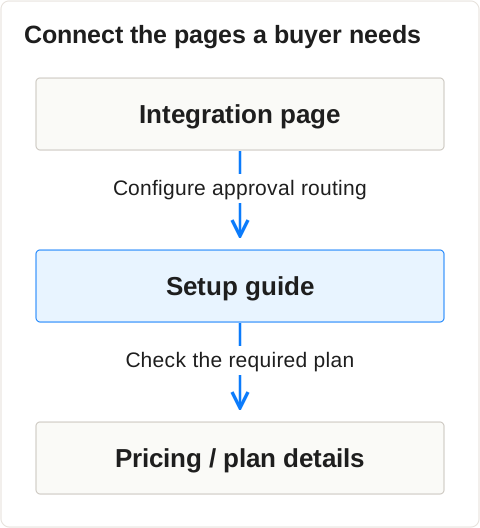
Keep the commercial overview and the setup procedure connected. For example, link “configure approval routing” from the integration page to the setup guide, then link the guide’s plan requirement to the exact pricing or entitlement section. These links help a reader finish the task; they don’t need a separate paragraph of SEO text around them.
Google’s guidance on performing well in AI search emphasizes useful, distinctive material and a good page experience. We use that standard in SEO & Content: publish something the reader can act on and verify.
Work on the sources shaping the product recommendation
Inspect the pages Google uses in the answers that matter to you. If they contain a wrong product claim, prepare a correction with current evidence. If they offer credible independent comparisons, work toward coverage that serves their readers. Improving your own page helps, but it doesn’t give you control over those publishers or Google’s choices.
Build the entity first: align product names, current capabilities and category descriptions across the pages you control. A retired offer on your homepage and an updated description in your documentation create an avoidable conflict.
Then choose the action from the actual source. If a cited comparison says your product lacks an integration it now supports, send the editor the current documentation and a reproducible example. If it omits you entirely, a factual correction request isn’t appropriate; offer a relevant demonstration for a future review instead.
Authority deserves work of its own. A carefully written page on a young website still needs discovery and credible recognition. Digital PR can support independent coverage; reviews and third-party mentions should reflect real experience. Prioritize sources relevant to your buyers and the answer you’re investigating.
Keep a record of the original claim, its URL, the supporting product evidence and the requested change. Our guide to incorrect AI product descriptions covers the correction process.
Measure appearances, clicks and commercial outcomes separately
Use saved answers to assess what Google says, Search Console to assess the reporting it provides, and analytics or CRM records to assess visits and leads. Google’s generative AI reporting now includes impression data worldwide, subject to availability for the property. That doesn’t make an impression, a product recommendation and a qualified visit interchangeable.
Check what the current Google report actually measures
Google’s current report documentation says generative AI impression reporting expanded worldwide on August 31, 2026. The Search report includes impressions from AI Overviews and AI Mode, with dimensions including page, country, device and date. A property may lack the report when impressions are insufficient.
| Evidence | Use it to answer | Limit |
|---|---|---|
| Saved Google result | Was the product recommended accurately in this observation? | It doesn’t show what every buyer saw |
| Generative AI performance report | Which pages received the reported generative impressions? | It isn’t documented as a separate AI Overview click or conversion report |
| Overall Search performance | Did clicks and impressions change for the relevant pages and queries? | The change doesn’t establish an AI-specific cause |
| Analytics and CRM | Did recorded visitors become qualified leads or progress toward purchase? | Earlier AI influence may be unrecorded |
Google says generative impressions are included in the broader performance reporting. Don’t add the two totals as though they represent separate exposure.
Decide what a disappointing result calls for
If the page remains unindexed after a revision, return to the technical investigation. If it is indexed but your saved answers still repeat an incorrect claim, revisit the evidence and sources. If appearances rise while clicks fall, inspect the questions and the visible answer before declaring success or failure.
Ask what the reader still needs after the summary: the full comparison, an implementation example, detailed compatibility information or a product demonstration. Make that next step useful and easy to find on the landing page. A title change alone won’t solve a page that offers no further value.
Treat AI search as an influence channel as well as a source of visits. Record buyer comments in sales notes and keep the pipeline measurement alongside the visibility evidence.
Log each revision and its indexing status alongside the observed answers. Use the record to prioritize your next AI Search Optimization task.
A 30-minute call where we map what AI says about you and build a tailored roadmap.
Frequently asked questions
A useful AI Overviews project has a defined question, a page with verifiable evidence and a way to review the result. Technical eligibility comes first, followed by content and authority work where the evidence supports it. Keep checking the specific Google experience you targeted, without promising an appearance or an inclusion deadline.
Can we guarantee that a page will appear in an AI Overview?
No. Google decides whether to show an Overview and which material to use. Technical eligibility allows a page to be considered. It doesn’t guarantee a link or a product recommendation, including for pages that already rank well in ordinary Search.
How long should we expect an improvement to take?
Google says recrawling can take days to weeks, and requesting it doesn’t guarantee inclusion. Recrawling, indexing and selection are different events. Check those stages before deciding that a rewrite failed; there isn’t a reliable deadline for appearing in an Overview.
Is optimizing for AI Overviews the same as optimizing for AI Mode?
They share Google’s underlying guidance for eligible websites, but they are different search experiences. Keep observations separate. An AI Mode appearance doesn’t establish an AI Overview appearance for the same question.
