Start with the questions you need to track. A plan that looks inexpensive for a small pilot can become a different purchase once you add Google AI Mode, another market or reporting access for your team.
We’ve compared six options for B2B SaaS teams, including what happens when you give them the same monitoring brief. Our recommendations come from official documentation and pricing checked on October 7, 2026. We haven’t run a hands-on accuracy test across all six products.
Which AI visibility tool fits your SaaS team?
For a dedicated marketing-team monitor, we’d start by evaluating Peec AI. For a small, inexpensive pilot, we’d start with OtterlyAI. Ahrefs Brand Radar is our first research candidate when the question list itself needs work. Existing subscriptions and required reporting access can change that shortlist; the deciding conditions are below.
| Your buying situation | Our first candidate | The condition that could change our recommendation |
|---|---|---|
| Marketing owns a recurring monitoring program | Peec AI | You need API access or coverage beyond its selected models and market allowance |
| You want a small initial baseline | OtterlyAI Lite | You need more than 15 prompts, API access or an engine sold separately |
| You need to discover topics beyond your own prompt list | Ahrefs Brand Radar | You only need custom tracking, so a research index may be unnecessary |
| Your team already works in Semrush | Semrush AI Visibility | Its custom tracking doesn’t document every Google experience you need |
| You need monitoring data in another system | Promptwatch | Verify that its API exposes the specific records your workflow requires |
| Procurement requires a tailored enterprise package | Profound | You need to evaluate your own prompts before committing |
These recommendations concern buying fit. Use the trial exercise below to assess the underlying answers before you choose.
Six AI visibility tools compared
The useful differences are in what you can research, what you can repeatedly track and what you can take out of the product. Each profile below gives our reason to consider the tool, a limitation that could change the purchase, and the specific evidence we’d request during evaluation.
 Peec AI: our starting point for a shared marketing workflow
Peec AI’s Starter plan includes 50 prompts, three chosen models, one project and unlimited users. That makes it a sensible first evaluation for a marketing team that already knows its category questions and needs several people to inspect the findings.
The published Starter choices include ChatGPT, Google AI Overviews and Google AI Mode. A team focused on those experiences can select them without treating all Google answers as one platform.
Our buying decision: evaluate Starter for a shared, single-market program. If your process depends on pulling data into an external dashboard, price that requirement first: API access is listed with Enterprise. Unlimited users don’t establish unlimited data access.
 OtterlyAI: a good fit when a small pilot is enough
OtterlyAI’s Lite plan includes 15 search prompts with daily tracking across ChatGPT, Google AI Overviews, Perplexity and Microsoft Copilot. It also lists reports and exports. API access appears in the Standard tier.
Our buying decision: consider Lite when a deliberately narrow question set fits the allowance. Write the list before subscribing. A pilot that drops your most important product comparisons to stay under the limit won’t answer the buying question.
Google AI Mode, Gemini and Claude are listed as add-ons. If Google AI Mode matters, get its price alongside the base plan. The included Google AI Overviews coverage doesn’t cover that separate requirement.
Ask for an exported answer record during evaluation. Check that a colleague can understand what was measured without needing the presenter to explain the chart.
 Ahrefs Brand Radar: strongest fit here for research before monitoring
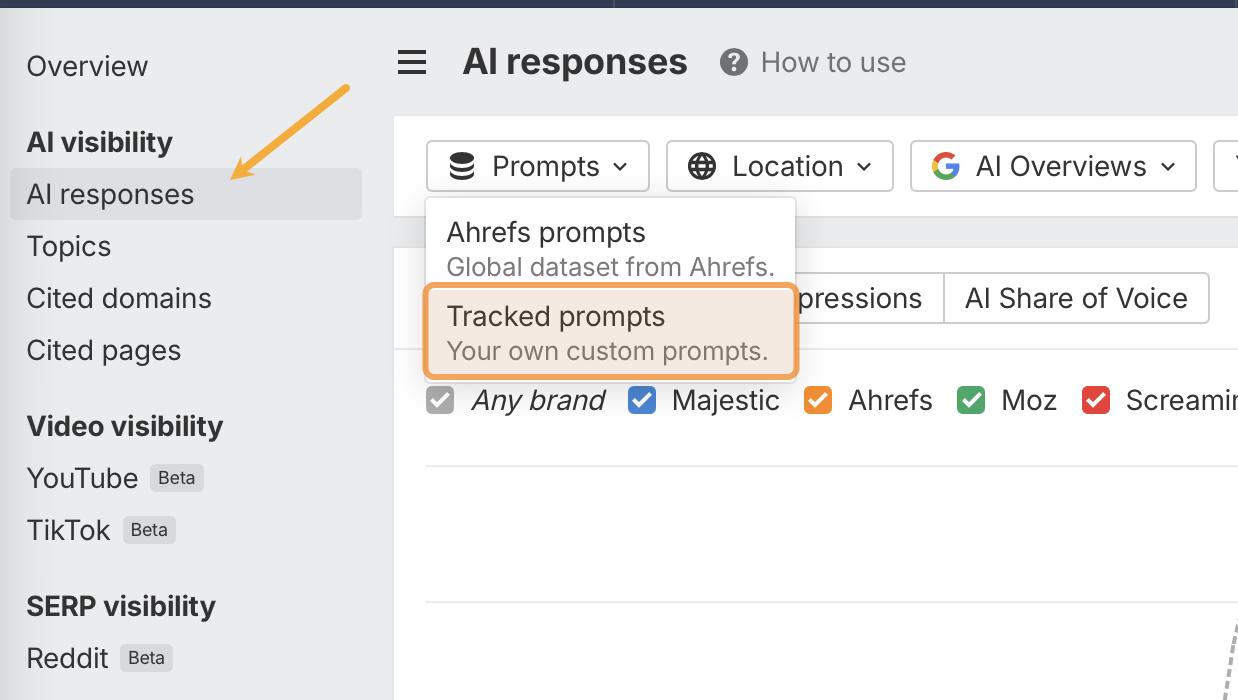
Ahrefs Brand Radar separates its AI Visibility Index from Custom Prompts. The index helps you explore questions already in its research database. Custom tracking repeatedly checks questions you choose.
Our buying decision: investigate the index when you’re entering a category or looking for topics your existing list misses. Buy custom tracking when you already have the list. These are distinct requirements, even though both appear in Brand Radar.
Its product documentation lists different update schedules for the research indexes and custom checks. Use the dataset filter when comparing results over time. A change in the wider research sample shouldn’t be mistaken for a change in your fixed monitoring set.
Check your existing allowance first. Ahrefs’ custom-prompt documentation lists 150 monthly checks on Lite, 300 on Standard and 600 on Advanced.
 Semrush AI Visibility: start here if your team already uses Semrush
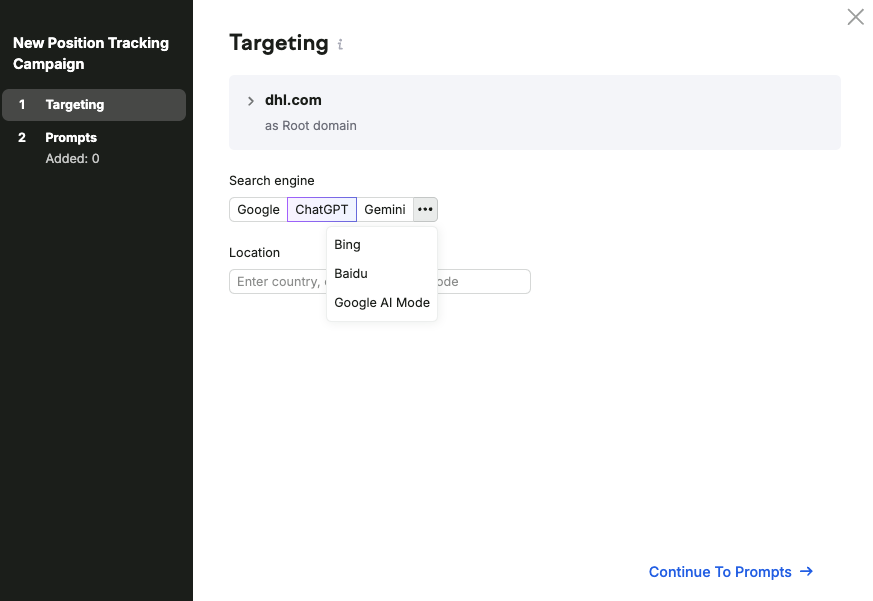
Semrush combines AI research with custom tracking, which makes it worth evaluating before introducing another vendor into an existing Semrush workflow. Its AI Visibility documentation lists 25 tracked prompts and one domain for Brand Performance analysis.
The distinction to inspect is platform coverage. Its Prompt Tracking documentation names ChatGPT Search, Google AI Mode and Gemini. It describes saved result snapshots and a Sources report. Broader AI Visibility research coverage shouldn’t be read as a promise that every platform supports custom tracking.
Our buying decision: evaluate it for the documented platforms if your analyst already works there. If custom Google AI Overviews monitoring is essential, ask for that exact workflow to be demonstrated before purchasing.
Extra domains and extra users are separate purchases. Adding one doesn’t automatically provide the other.
 Promptwatch: a candidate when reporting access matters from the start
Promptwatch’s Essential plan lists 50 prompts, four tracked models and 6,000 responses, plus API and MCP access. It separately includes 500 agent credits.
Our buying decision: put it on the shortlist when monitoring needs to feed an existing reporting process. The entry plan’s listed API access gives you a concrete requirement to test before considering a larger contract elsewhere.
Have your analyst retrieve a dated answer with its prompt, platform and source URLs. Confirm history and endpoint access for the plan you’re buying. An API label alone doesn’t confirm that every field is available.
Evaluate agent features on their own merits. Response capacity pays for monitoring; agent credits fund other tasks. If an agent proposes new content, someone still needs to verify its product claims and decide whether the piece adds useful evidence.
 Profound: evaluate a custom enterprise requirement with a custom demo
Profound’s current brand pricing page presents a trial and a custom Enterprise package. Enterprise includes tailored tracking and organizational features, with API access and exports listed in the offer.
The trial runs 50 prompts each day for seven days, but its recommended prompts can’t be customized. It’s therefore a way to inspect the product, with a clear limit on testing your own SaaS category.
Our buying decision: consider Profound when procurement needs a tailored package. Make a demonstration using your questions part of the evaluation. A preset trial can’t establish whether the proposed contract covers a narrow category well.
Have the quote specify engines, markets, question allowance, retained history, exports and access controls. Ask the demonstrator to investigate a wrong product claim as well as show the summary dashboard.
What would these tools cost for the same monitoring brief?
Price the same questions, engines and market across vendors. For the example below, Ahrefs Basic and Peec Starter have documented capacity for the brief. OtterlyAI Lite is too small, and Google AI Mode costs extra. Semrush’s published custom-tracking coverage doesn’t establish a complete match. Those differences matter more than the cheapest advertised price.
Our illustrative brief is 20 questions, checked daily in the United States across ChatGPT, Google AI Overviews and Google AI Mode. Over 30 days, that’s 1,800 question-engine observations. These are planning assumptions, not measured demand or actual test results.
| Product | Published price and allowance | Decision for this brief |
|---|---|---|
| Ahrefs custom tracking | US$50/mo for Basic; 2,500 checks | Capacity fits: 20 × 3 × 30 = 1,800 checks. Confirm the purchase route for your account. |
| Peec AI Starter | €85/mo; 50 prompts, three selected models, one country | Capacity and listed model choices fit. The example uses 20 of the 50 prompts. |
| OtterlyAI | US$29/mo Lite: 15 prompts. US$189/mo Standard: 100 prompts. | Standard is the first listed tier large enough. Add the quoted Google AI Mode charge. |
| Semrush AI Visibility | US$99/mo reference price; 25 prompts | Don’t treat this as a confirmed quote for the brief: custom AI Overviews coverage isn’t documented in the cited tracking guide. |
| Promptwatch Essential | US$95/mo; 50 prompts, four models, 6,000 responses | Capacity fits. Confirm that both Google experiences can be selected within the four-model allowance. |
| Profound | Custom Enterprise quote | Ask for a quote for this exact brief. The preset trial can’t substitute for it. |
Prices were checked October 7, 2026 using the linked vendor pages. Peec’s amount was visible with monthly billing selected; currencies haven’t been converted. Semrush’s knowledge base supplies the US-dollar reference; its checkout pricing and an existing annual subscription can change the billing basis. Taxes and account-specific terms need checking.
Ahrefs explicitly defines a check as one execution of a prompt on one model in one location. That lets us calculate its capacity. For other providers, confirm how reruns, failed checks and additional locations affect the bill.
Our recommendation for this brief: compare Ahrefs custom tracking and Peec Starter first. Add Promptwatch if API access is important. Price OtterlyAI’s full required package before comparing it with either. This conclusion is about documented scope and cost, not comparative answer accuracy.
Research is a separate budget decision: Ahrefs lists index access from US$199/mo per index. Software also needs someone to act on its findings. Our guide to AI Search Optimization costs covers that work.
How to evaluate a tool with your own buyer questions
Give shortlisted vendors the same questions and require an inspectable answer for each result. Test whether the software detects your product correctly, distinguishes a recommendation from a source link, and preserves enough evidence to assign a useful next action. Keep the question set fixed so a reporting change has an interpretable cause.
Use a question set that can reveal a bad recommendation
Build the entity first: define your product name, aliases and direct competitors. Then include questions where an accurate answer might disqualify your product. A monitor should help you understand buyer fit, including the cases where your product shouldn’t win.
For a fictional approval-software company, we’d start with questions like these. Replace the bracketed names with real products; these are proposed evaluation questions, not measured search volumes.
| Question to test | What we’d inspect |
|---|---|
| Which approval software suits a finance team using Salesforce? | Whether the recommendation explains integration requirements |
| What are the alternatives to [competitor] for multi-step purchase approvals? | Whether your product appears for a relevant switching need |
| Does [our product] support approval routing on its entry plan? | Whether the plan restriction is correct |
| When should a team choose [competitor] instead of [our product]? | Whether the limitations and tradeoffs are fair |
Make the vendor explain an apparent improvement
Use this hypothetical reporting problem during evaluation. Your product appears in 12 of 40 completed answers in the first period. In the next, it appears in 12 of 20. The mention rate rises from 30% to 60%, even though the number of answers mentioning you stays the same.
The arithmetic doesn’t explain why the denominator shrank. Ask the vendor to show the completed checks, failures and any changes to the prompt set. Then compare the same eligible questions across periods. Don’t describe this example as a share-of-voice calculation unless the vendor defines its metric that way.
We’d reject a reporting workflow that can’t reconcile the headline with its underlying records. A team shouldn’t have to guess whether an improvement came from better answers or a changed sample.
Turn one answer into a task before choosing
Suppose an answer incorrectly says your Salesforce integration requires a custom build. A useful record would identify the exact claim, the answer’s sources, your current integration documentation and an owner for the correction.
If the supporting material lacks implementation detail, get primary research from the product specialist. If a publisher repeats an obsolete restriction, provide evidence and request a correction. Our guides to incorrect AI product descriptions and third-party mentions explain those follow-up decisions.
A trial passes when your team can complete that investigation and hand over a specific task. Treat AI search as an influence channel: monitor recommendation accuracy and buyer fit, then connect the findings to pipeline measurement. That is the purpose of our AI Search Optimization work.
A 30-minute call where we map what AI says about you and build a tailored roadmap.
Frequently asked questions
You can begin with manual checks, but a paid tool becomes useful when repeat collection and evidence handling consume time your team needs for improvements. Before purchasing, distinguish the provider’s demand estimates from observed answers, and establish who will act on the findings. Monitoring alone doesn’t change a buyer’s recommendation.
Can we check AI visibility without paying for a tool?
Yes. Save dated answers for a fixed set of questions, recording platform, location and source links. Repeat the same checks. This can establish what you need from software, though it won’t show what every buyer sees. Pay when collection, history or collaboration becomes the work you need to remove.
Does prompt volume mean the same thing as Google search volume?
Ask how the provider derives it. Ahrefs describes search-backed research prompts; Peec describes a relative topic-demand score. Those measures don’t establish how many people asked an exact question across AI assistants. Use them to guide research, with their definitions attached.
Can an AI visibility tool make AI recommend our product?
It can help identify what to investigate, and some products support content tasks. A subscription doesn’t guarantee recommendations. Product accuracy, useful evidence and authority still require work. Choose the tool that helps your team complete that work and assess whether buyers receive a better answer.
